


实战练习-React 实现日历组件
复习Date Api
创建 Date 对象时可以传入年月日时分秒。
new Date(2025, 6, 6)

// Sun Jul 06 2025 00:00:00 GMT+0800 (中国标准时间)
可以调用 toLocaleString 来转成当地日期格式的字符串显示:
new Date(2025, 6, 6).toLocaleDateString()

// 2025/7/6
Date 的 month 是从 0 开始计数的,取值是 0 到 11,所以传 6 得到的是 7 月
而日期 date 是从 1 到 31。
而且有个小技巧,当你 date 传 0 的时候,取到的是上个月的最后一天:
new Date(2025, 6, 0).toLocaleDateString()

// 2025/6/30
-1 就是上个月的倒数第二天,-2 就是倒数第三天这样。
console.log(new Date(2025, 6, 0).toLocaleDateString())
console.log(new Date(2025, 6, -1).toLocaleDateString())
console.log(new Date(2025, 6, -2).toLocaleDateString())
console.log(new Date(2025, 6, -3).toLocaleDateString())
console.log(new Date(2025, 6, -4).toLocaleDateString())

// 2025/6/30
// 2025/6/29
// 2025/6/28
// 2025/6/27
// 2025/6/26
这个小技巧有很大的用处,可以用这个来拿到每个月有多少天
console.log('25年1月有' + new Date(2025, 1, 0).getDate() + '天')
console.log('25年2月有' + new Date(2025, 2, 0).getDate() + '天')
console.log('25年3月有' + new Date(2025, 3, 0).getDate() + '天')
console.log('25年4月有' + new Date(2025, 4, 0).getDate() + '天')
console.log('25年5月有' + new Date(2025, 5, 0).getDate() + '天')
console.log('25年6月有' + new Date(2025, 6, 0).getDate() + '天')
console.log('25年7月有' + new Date(2025, 7, 0).getDate() + '天')
console.log('25年8月有' + new Date(2025, 8, 0).getDate() + '天')
console.log('25年9月有' + new Date(2025, 9, 0).getDate() + '天')
console.log('25年10月有' + new Date(2025, 10, 0).getDate() + '天')
console.log('25年11月有' + new Date(2025, 11, 0).getDate() + '天')
console.log('25年12月有' + new Date(2026, 0, 0).getDate() + '天')

25年1月有31天
25年2月有28天
25年3月有31天
25年4月有30天
25年5月有31天
25年6月有30天
25年7月有31天
25年8月有31天
25年9月有30天
25年10月有31天
25年11月有30天
25年12月有31天
除了日期外,也能通过 getFullYear、getMonth 拿到年份和月份:
const date = new Date(2026, 0, 0)
console.log(`${date.getFullYear()}年${date.getMonth() + 1}月${date.getDate()}日`)

// 2025年12月31日
还可以通过 getDay 拿到星期几。
const date = new Date(2026, 0, 0)
console.log(`${date.getFullYear()}年${date.getMonth() + 1}月${date.getDate()}日,星期${date.getDay()}`)

// 2025年12月31日,星期3
getDay 返回范围 0-6 周日~周六
实现日历组件
日历组件的state
从简单的开始,我们需要一个当前日期的 state ,我们也希望可以从使用的时候指定值!
type CalendarProps = {
    defaultValue: Date
}
const [date, setDate] = useState(props.defaultValue)
切换月份功能
首先希望月份是显示中文
const monthNames = [
    '一月',
    '二月',
    '三月',
    '四月',
    '五月',
    '六月',
    '七月',
    '八月',
    '九月',
    '十月',
    '十一月',
    '十二月',
];

// matchZhMonth 匹配月份的中文
function matchZhMonth(date: Date) {
    return monthNames[date.getMonth()]
}
<div className="width-full flex justify-center items-center mb-5">
    <span
        className="iconfont iconf-left text-lg inline-block border border-zinc-600 p-[1px]"
        onClick={preMonth} />
    <div
        className="text-2xl inline-block w-[150px] text-center">
        {`${date.getFullYear()}-${matchZhMonth(date)}`}
    </div>
    <span
        className="iconfont iconf-right text-lg inline-block border border-zinc-600 p-[1px]"
        onClick={nextMonth} />
</div>
下面是切换月份的实现~
const preMonth = () => {
    setdate(new Date(date.getFullYear(), date.getMonth() - 1, 1))
}
const nextMonth = () => {
    setdate(new Date(date.getFullYear(), date.getMonth() + 1, 1))
}
这样头部显示的就是当前指定日期的年月,以及切换月份的按钮
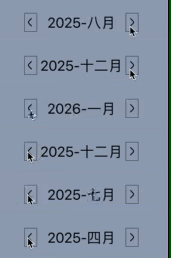
渲染经典日历的头部部分
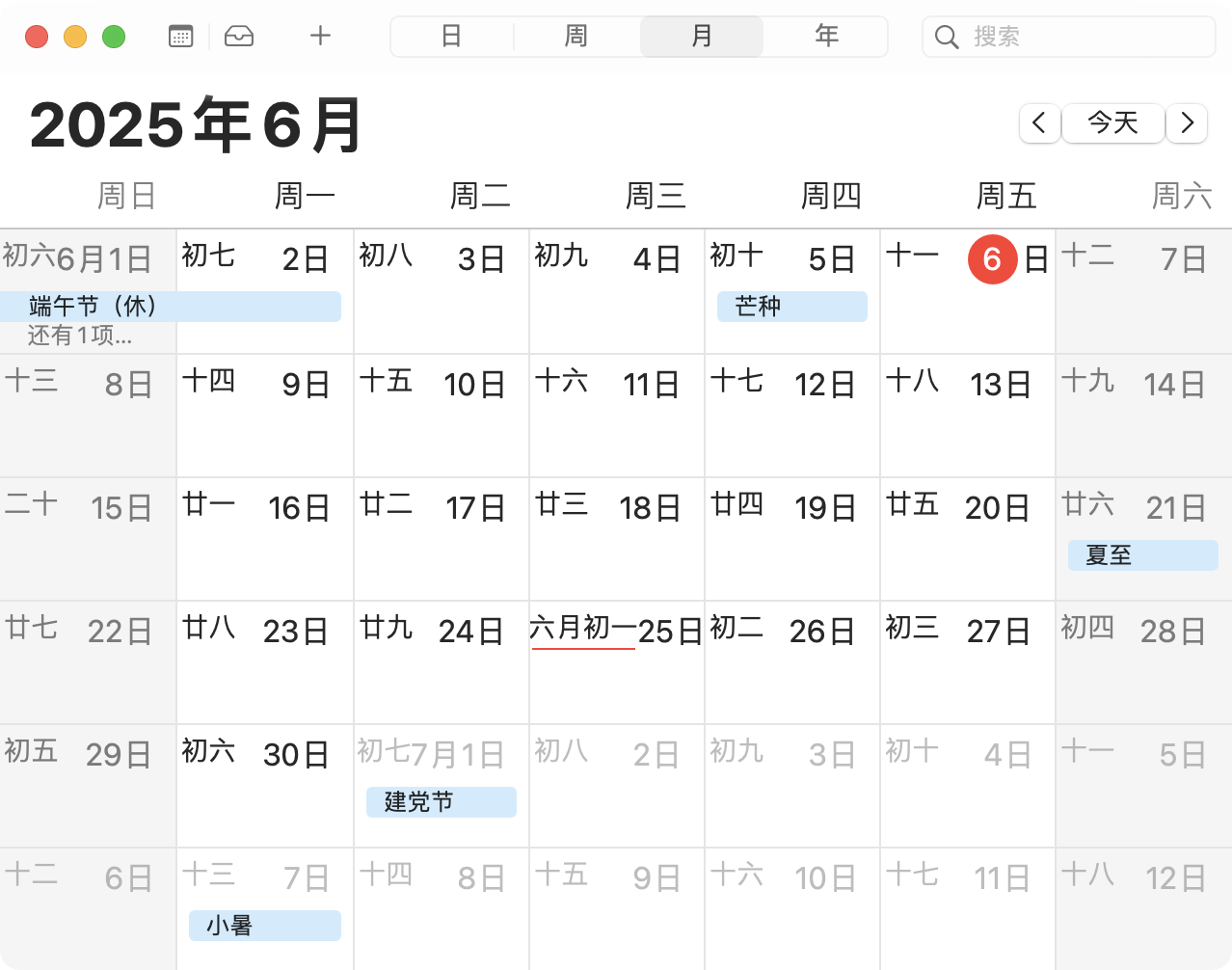
这块部分都是固定写死的,因为 getDay 的 周日是 0 所以日历一般都是周日开头
<div className="days grid grid-cols-7 ">
    <div className="day w-10 text-center">日</div>
    <div className="day w-10 text-center">一</div>
    <div className="day w-10 text-center">二</div>
    <div className="day w-10 text-center">三</div>
    <div className="day w-10 text-center">四</div>
    <div className="day w-10 text-center">五</div>
    <div className="day w-10 text-center">六</div>
</div>
这一块使用了 tailwind gird 布局!
渲染当月的所有日期!
这里主要考虑两个问题:
- 获取这个月的第一天是周几
- 获取当月有多少天!
// firstDayWeekOfMonth 获取月份的第一天是周几
const firstDayWeekOfMonth = (year: number, month: number) => {
    return new Date(year, month, 1).getDay();
};

// totalDaysOfMonth 获取月的总天数
const totalDaysOfMonth = (year: number, month: number) => {
    return new Date(year, month + 1, 0).getDate();
};
然后我们开始写渲染当月天数的逻辑
比如某个月第一天是周二,那么前两天就是空白渲染或者用上个月的日期渲染都可以,我们这里先用空白来渲染!
function renderDays(date: Date) {
    // 最终渲染的数组 = 空周+当月天数
    const days = []

    // startWeek 开始周
    const startWeek = firstDayWeekOfMonth(date.getFullYear(), date.getMonth())

    // totalDays 总共的天数
    const totalDays = totalDaysOfMonth(date.getFullYear(), date.getMonth())

    // 先根据这月的一号开始周来填充空白
    for (let i = 0; i < startWeek; i++) {
        days.push(0)
    }

    // 填充当月的天数
    for (let i = 0; i < totalDays; i++) {
        days.push(i + 1)
    }

    return days
}
然后看看完整代码的效果!
import { useState } from "react";

const monthNames = [
    '一月',
    '二月',
    '三月',
    '四月',
    '五月',
    '六月',
    '七月',
    '八月',
    '九月',
    '十月',
    '十一月',
    '十二月',
];
function matchZhMonth(date: Date) {
    return monthNames[date.getMonth()]
}

// firstDayWeekOfMonth 获取月份的第一天是周几
const firstDayWeekOfMonth = (year: number, month: number) => {
    return new Date(year, month, 1).getDay();
};

// totalDaysOfMonth 获取月的总天数
const totalDaysOfMonth = (year: number, month: number) => {
    return new Date(year, month + 1, 0).getDate();
};
type CalendarProps = {
    defaultValue: Date
}
function renderDays(date: Date) {
    // 最终渲染的数组 = 空周+当月天数
    const days = []

    // startWeek 开始周
    const startWeek = firstDayWeekOfMonth(date.getFullYear(), date.getMonth())

    // totalDays 总共的天数
    const totalDays = totalDaysOfMonth(date.getFullYear(), date.getMonth())

    // 先根据这月的一号开始周来填充空白
    for (let i = 0; i < startWeek; i++) {
        days.push(0)
    }

    // 填充当月的天数
    for (let i = 0; i < totalDays; i++) {
        days.push(i + 1)
    }

    return days
}
const Calendar: React.FC<CalendarProps> = (props) => {
    const [date, setDate] = useState(props.defaultValue)


    const preMonth = () => {
        setDate(new Date(date.getFullYear(), date.getMonth() - 1, 1))
    }
    const nextMonth = () => {
        setDate(new Date(date.getFullYear(), date.getMonth() + 1, 1))
    }
    return <div>
        <div className="width-full flex justify-center items-center mb-5">
            <span
                className="iconfont iconf-left text-lg inline-block border border-zinc-600 p-[1px]"
                onClick={preMonth} />
            <div
                className="text-2xl inline-block w-[150px] text-center">
                {`${date.getFullYear()}-${matchZhMonth(date)}`}
            </div>
            <span
                className="iconfont iconf-right text-lg inline-block border border-zinc-600 p-[1px]"
                onClick={nextMonth} />
        </div>

        <div className="days grid grid-cols-7 ">
            <div className="day w-10 text-center">日</div>
            <div className="day w-10 text-center">一</div>
            <div className="day w-10 text-center">二</div>
            <div className="day w-10 text-center">三</div>
            <div className="day w-10 text-center">四</div>
            <div className="day w-10 text-center">五</div>
            <div className="day w-10 text-center">六</div>
        </div>
        <div className="days grid grid-cols-7 ">
            {renderDays(date).map(el => {
                return <div className="day w-10 text-center">{el ? el : ' '}</div>
            })}
        </div>
    </div>
}


export default Calendar;
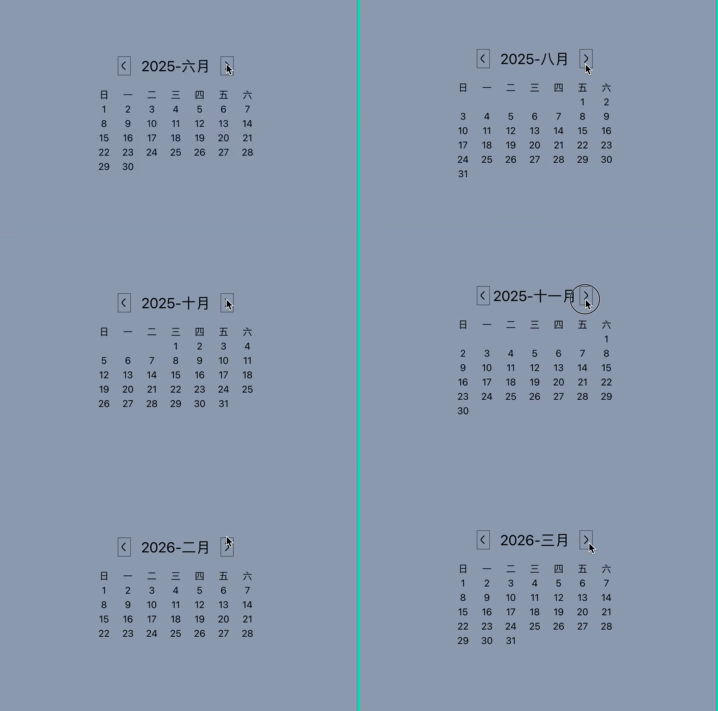
日期高亮显示,日期切换
定义onChange 类型,让组件外部接受的回调参数为选中的日期类型
type CalendarProps = {
    defaultValue: Date;
    onChange: (date: Date) => void
}
选中高亮,其实就对比日期就好!
<div className="days grid grid-cols-7 ">
    {renderDays(date).map(el => {
        return <div
            onClick={() => onChangeCallBack(el)}
            className={`day w-10 text-center cursor-pointer hover:text-red-700 ${date.getDate() === el ? 'text-white bg-black round
            {el ? el : ' '}
        </div>
    })}
</div>
切换设置 state 并回调
const onChangeCallBack = (clickDate: number) => {
    const callDate = new Date(date.getFullYear(), date.getMonth(), clickDate)
    setDate(callDate)
    props.onChange(callDate)
}
外部组件使用
import { useState } from 'react';
import Calendar from './components/Calendar';

function App() {
  const [currentDate, setCurrentDate] = useState(new Date())
  return <>
    <div className='flex justify-center items-center h-full w-full bg-slate-400'>
      <div>
        <div className='text-lg font-bold text-center'>{currentDate.toLocaleDateString()}</div>
        <Calendar defaultValue={currentDate} onChange={(date) => {
          setCurrentDate(date)
        }} />
      </div>
    </div>
  </>
}
export default App;

这里其实之前漏了一点,月份切换也需要执行回调!
const preMonth = () => {
    const callDate = new Date(date.getFullYear(), date.getMonth() - 1, 1)
    setDate(callDate)
    props.onChange(callDate)
}

const nextMonth = () => {
    const callDate = new Date(date.getFullYear(), date.getMonth() + 1, 1)
    setDate(callDate)
    props.onChange(callDate)
}

现在这个 Calendar 组件就是可用的了
可以通过
defaultValue来传入初始的date值,修改 date 之后可以在onChange里拿到最新的值
当前完整组件代码
import { useState } from "react";

const monthNames = [
    '一月',
    '二月',
    '三月',
    '四月',
    '五月',
    '六月',
    '七月',
    '八月',
    '九月',
    '十月',
    '十一月',
    '十二月',
];
function matchZhMonth(date: Date) {
    return monthNames[date.getMonth()]
}

// firstDayWeekOfMonth 获取月份的第一天是周几
const firstDayWeekOfMonth = (year: number, month: number) => {
    return new Date(year, month, 1).getDay();
};

// totalDaysOfMonth 获取月的总天数
const totalDaysOfMonth = (year: number, month: number) => {
    return new Date(year, month + 1, 0).getDate();
};
type CalendarProps = {
    defaultValue: Date;
    onChange: (date: Date) => void
}
function renderDays(date: Date) {
    // 最终渲染的数组 = 空周+当月天数
    const days = []

    // startWeek 开始周
    const startWeek = firstDayWeekOfMonth(date.getFullYear(), date.getMonth())

    // totalDays 总共的天数
    const totalDays = totalDaysOfMonth(date.getFullYear(), date.getMonth())

    // 先根据这月的一号开始周来填充空白
    for (let i = 0; i < startWeek; i++) {
        days.push(0)
    }

    // 填充当月的天数
    for (let i = 0; i < totalDays; i++) {
        days.push(i + 1)
    }

    return days
}
const Calendar: React.FC<CalendarProps> = (props) => {
    const [date, setDate] = useState(props.defaultValue)

    const preMonth = () => {
        const callDate = new Date(date.getFullYear(), date.getMonth() - 1, 1)
        setDate(callDate)
        props.onChange(callDate)
    }
    const nextMonth = () => {
        const callDate = new Date(date.getFullYear(), date.getMonth() + 1, 1)
        setDate(callDate)
        props.onChange(callDate)
    }

    const onChangeCallBack = (clickDate: number) => {
        const callDate = new Date(date.getFullYear(), date.getMonth(), clickDate)
        setDate(callDate)
        props.onChange(callDate)
    }
    return <div>
        <div className="width-full flex justify-center items-center mb-5">
            <span
                className="iconfont iconf-left text-lg inline-block border border-zinc-600 p-[1px]"
                onClick={preMonth} />
            <div
                className="text-2xl inline-block w-[150px] text-center">
                {`${date.getFullYear()}-${matchZhMonth(date)}`}
            </div>
            <span
                className="iconfont iconf-right text-lg inline-block border border-zinc-600 p-[1px]"
                onClick={nextMonth} />
        </div>

        <div className="days grid grid-cols-7 ">
            <div className="day w-10 text-center">日</div>
            <div className="day w-10 text-center">一</div>
            <div className="day w-10 text-center">二</div>
            <div className="day w-10 text-center">三</div>
            <div className="day w-10 text-center">四</div>
            <div className="day w-10 text-center">五</div>
            <div className="day w-10 text-center">六</div>
        </div>
        <div className="days grid grid-cols-7 ">
            {renderDays(date).map(el => {
                return <div
                    onClick={() => onChangeCallBack(el)}
                    className={`day w-10 text-center cursor-pointer hover:text-red-700 ${date.getDate() === el ? 'text-white bg-black rounded-lg' : ''}`}>
                    {el ? el : ' '}
                </div>
            })}
        </div>
    </div>
}


export default Calendar;
通过 ref 暴露组件API
使用 forwardRef + useImperativeHandle
其实没有大的改动内部逻辑不会变动!
const InternalCalendar: React.ForwardRefRenderFunction<CalendarRef, CalendarProps> = (props, ref) => {
组件类型为 React.ForwardRefRenderFunction 这个类型接受两个泛型参数
- 第一个就是你要定义暴露
ref api的类型定义 - 第二个就是组件的
props类型
export type CalendarProps = {
    defaultValue: Date;
    onChange: (date: Date) => void
}

export type CalendarRef = {
    getDate: () => Date;
    setDate: (date: Date) => void;
}
通过 useImperativeHandle 定义ref暴露的 getDate和setDate 方法, 分别用来获取和设置日期!
useImperativeHandle(ref, () => {
    return {
        getDate: () => date,
        setDate: (date: Date) => {
            setDate(date)
            props.onChange(date)
        }
    }
})
暴露组件的方式也要改下 使用 React.forwardRef 来包裹 ForwardRefRenderFunction 类型的组件
const Calendar = React.forwardRef(InternalCalendar);
export default Calendar;
来外部试用下
import { useRef, useState } from 'react';
import Calendar, { CalendarProps, CalendarRef } from './components/Calendar';


function App() {
  const [currentDate, setCurrentDate] = useState(new Date())

  const calendarRef = useRef<CalendarRef>(null);

  const handleRefSetDate = () => {
    calendarRef.current?.setDate(new Date(2099, 11, 31))
  }
  return <>
    <div className='flex justify-center items-center h-full w-full bg-slate-400'>
      <div>
        <div className='text-lg font-bold text-center'>{currentDate.toLocaleDateString()}</div>
        <Calendar
          ref={calendarRef}
          defaultValue={currentDate}
          onChange={(date) => {
            setCurrentDate(date)
          }} />

        <button
          className='border p-2 bg-red-500 text-white mt-10'
          onClick={handleRefSetDate}>
          外部手动设置日期为 2099年 12 月 31
        </button>
        <button
          className='border p-2 bg-red-500 text-white mt-10'
          onClick={() => alert(calendarRef.current?.getDate())}>
          弹出当前日期
        </button>
      </div>
    </div>
  </>
}
export default App;
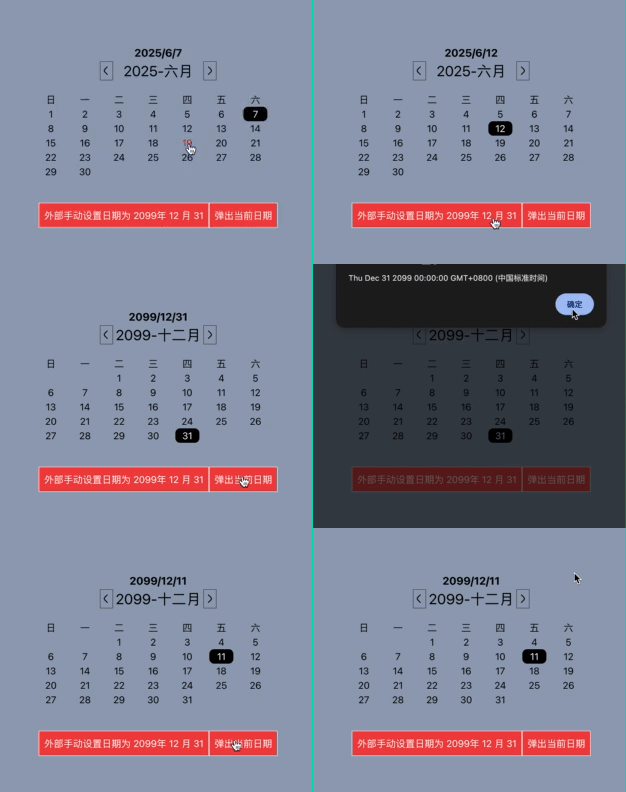
同时兼容受控和非受控模式
复习下:什么是受控,什么是非受控呢?一般涉及到表单的处理!
非受控组件
import { useRef, useState } from "react";

function App() {
  console.log("组件渲染");
  const [username, setUsername] = useState("");
  const inputRef = useRef<HTMLInputElement>(null);
  const handleSubmit = () => {
    console.log(inputRef.current?.value);
  };
  return (
    <>
      <div className="flex justify-center items-center h-full w-full">
        <input
          ref={inputRef}
          className="border rounded-sm p-2 outline-0"
          type="text"
          defaultValue={username}
        />

        <button
          className="border rounded-sm p-2 outline-0 bg-blue-400 text-white"
          onClick={handleSubmit}
        >
          提交
        </button>
      </div>
    </>
  );
}
export default App;
- 使用
defaultValue:使用了defaultValue={username}来设置初始值,但没有提供onChange事件处理函数。 - 未绑定状态更新:
username状态变量仅用于初始值设置,之后不会随用户输入而更新。 - 依赖
ref获取值:你使用inputRef.current?.value在提交时直接读取 DOM 值,而不是从状态变量中获取。
非受控的特点就是不去控制 input 输入的结果,我们只会去获取用户输入的值!
受控组件
import { useState } from "react";

function App() {
  const [username, setUsername] = useState("");
  console.log("组件渲染");
  return (
    <>
      <div className="flex justify-center items-center h-full w-full">
        <input
          className="border rounded-sm p-2 outline-0"
          type="text"
          value={username}
          onChange={(e) => setUsername(e.target.value)}
        />
      </div>
    </>
  );
}
export default App;
- 输入框的值始终与
username状态保持一致 - 所有输入变化都通过 React 状态系统处理
- React 完全控制输入框的渲染和更新
我自己其实不太喜欢受控组件,受控模式每次 setValue 都会导致组件重新渲染。
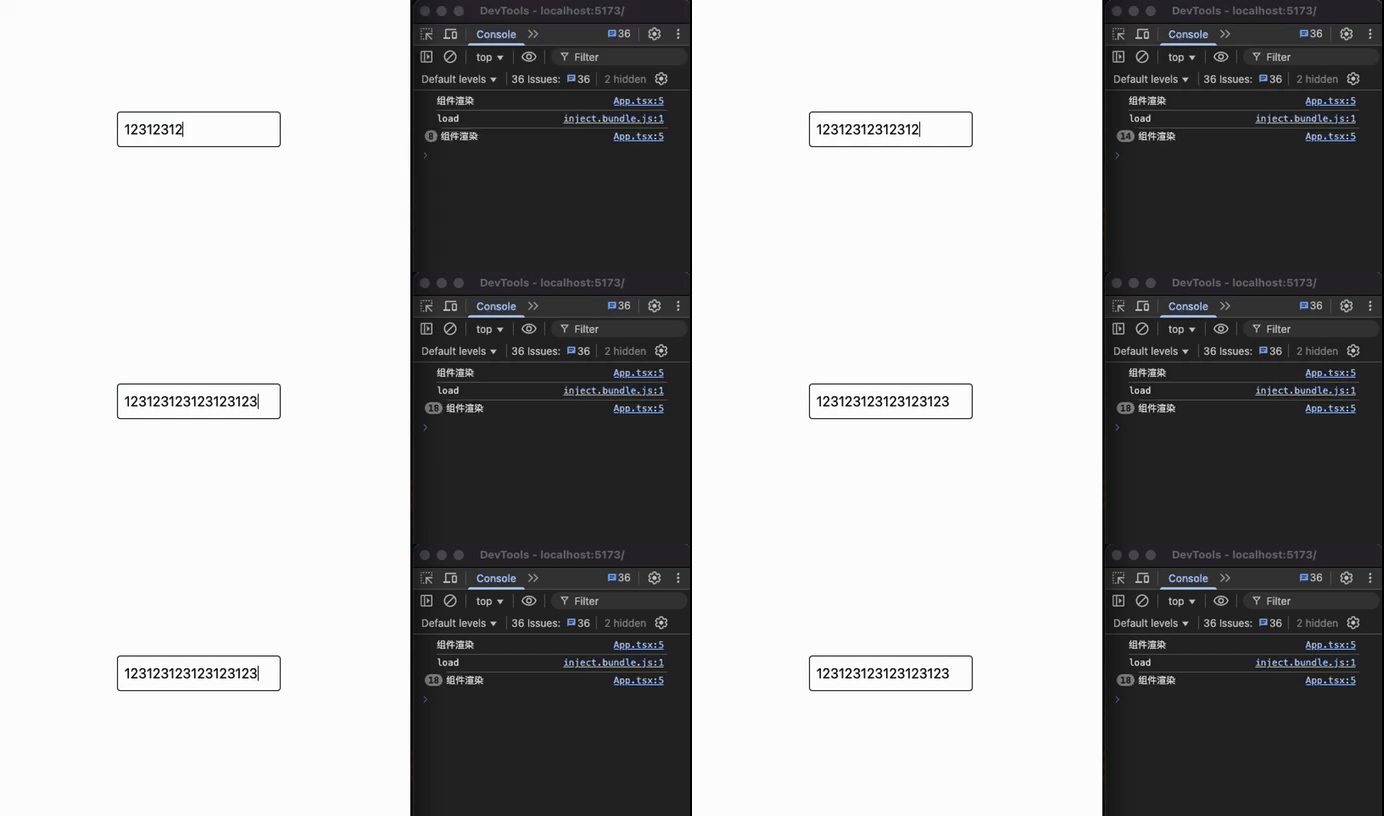
而非受控模式下只会渲染一次
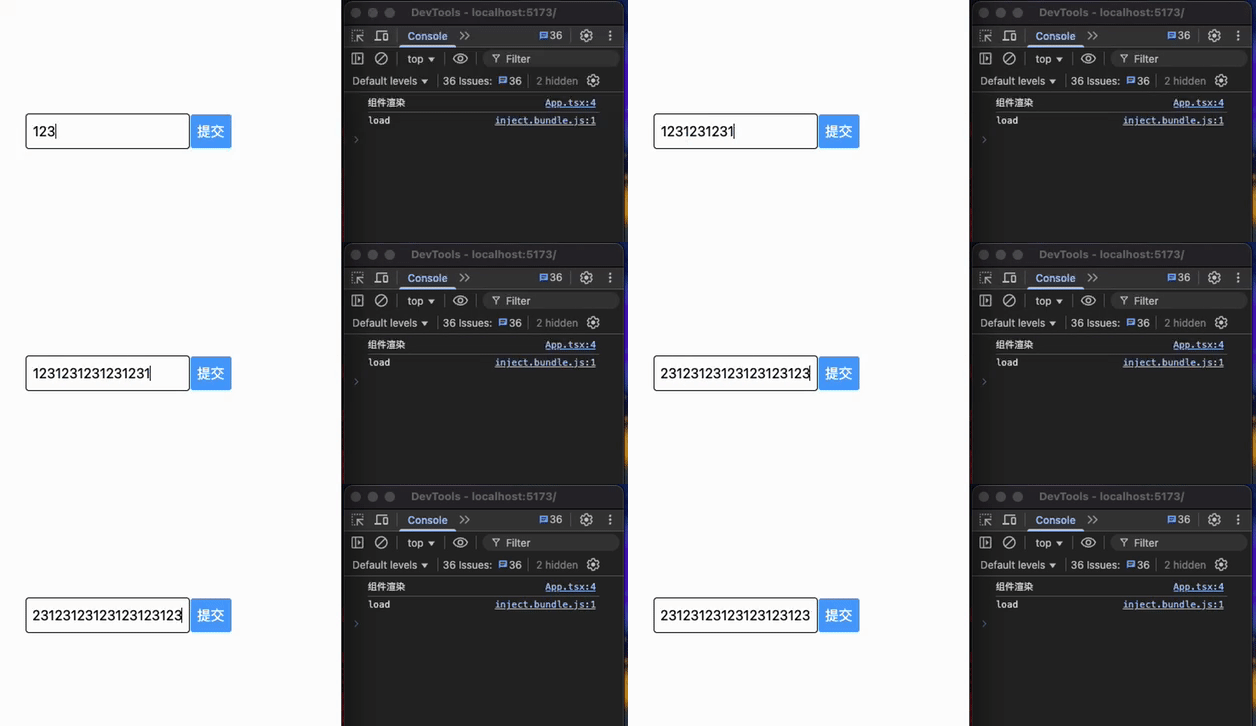
虽然我不喜欢受控模式,但是什么时候还是得用受控模式呢?
需要对输入的值做处理之后设置到表单的时候,或者是你想实时同步状态值到父组件
比如把用户输入改为大写:
import { useState } from "react";

function App() {
  const [username, setUsername] = useState("");
  console.log("组件渲染");
  return (
    <>
      <div className="flex justify-center items-center h-full w-full">
        <input
          className="border rounded-sm p-2 outline-0"
          type="text"
          value={username}
          onChange={(e) => setUsername(e.target.value.toLocaleUpperCase())}
        />
      </div>
    </>
  );
}
export default App;
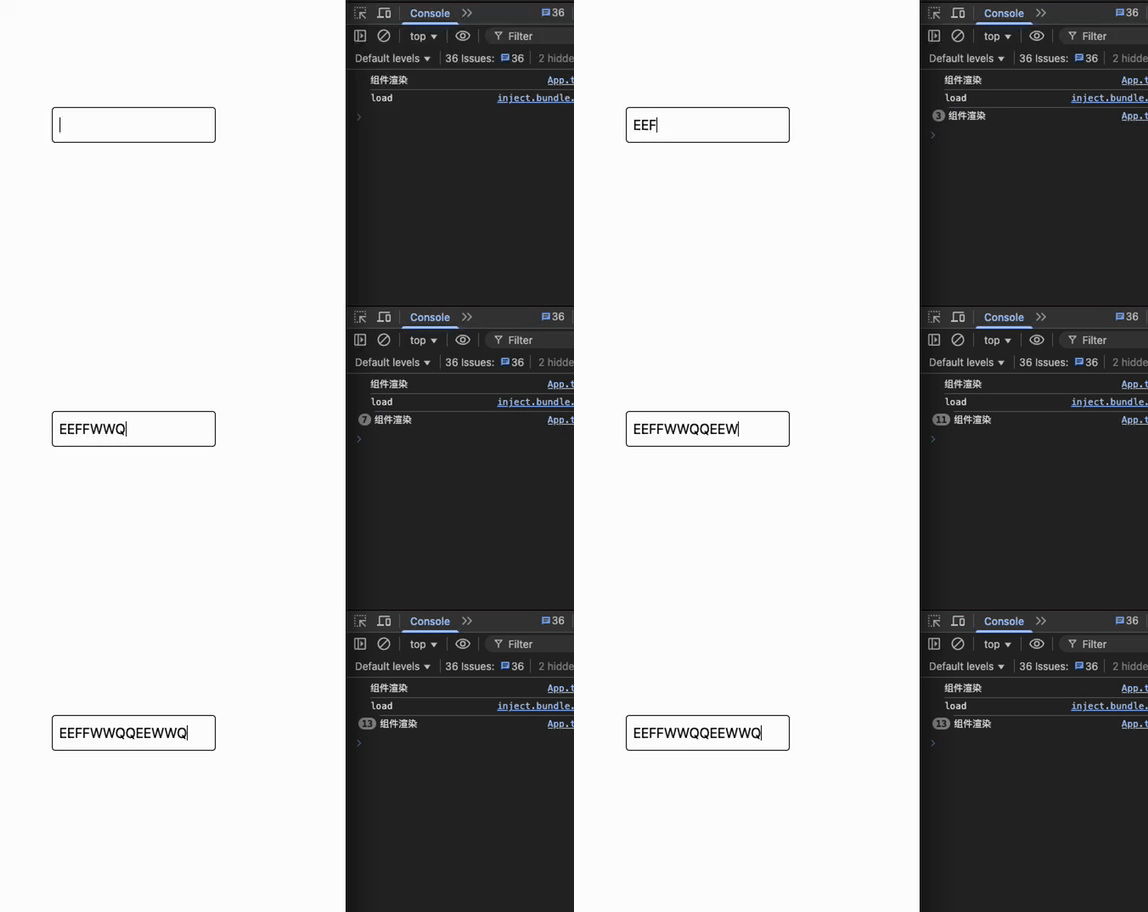
不过基础组件基本都要受控和非受控都要支持才行!
如何同时兼容呢?
参数同时支持 value 和 defaultValue,通过判断 value 是不是 undefined 来区分受控模式和非受控模式。
如果传入了 value 为受控,那么就让 value 的值完全控制组件值的显示!
如果没有传入 value 传入了 defaultValue 那么只做默认值,由内部的 state 来控制组件的值显示!
如果是非受控模式,则内部维护 value
如果是受控,则只回调 onChange
import { useEffect, useState, type ChangeEvent } from "react";

type FCProps = {
  value?: string;
  defaultValue?: string;
  onChange?: (val: string) => void;
};

const MInput: React.FC<FCProps> = (props) => {
  // 判断是否为受控模式
  const { value: valueProp, defaultValue, onChange } = props;

  const isControlled = valueProp !== undefined;

  const [value, setValue] = useState(isControlled ? valueProp : defaultValue);

  function handleChange(e: ChangeEvent<HTMLInputElement>) {
    const newValue = e.target.value;
    if (onChange) {
      onChange(newValue);
    }
    if (!isControlled) {
      setValue(newValue);
    }
  }

  useEffect(() => {
    if (isControlled && valueProp !== undefined) {
      setValue(valueProp);
    }
  }, [isControlled, valueProp]);

  return (
    <div>
      <input
        className="border rounded-sm p-2 outline-0"
        type="text"
        value={value}
        onChange={handleChange}
      />
    </div>
  );
};
export default MInput;
非受控使用
<MInput defaultValue={outterValue} onChange={(v) => console.log(v)} />;
受控使用
import { useState } from "react";
import MInput from "./components/Input";

function App() {
  const [outterValue, setOutterValue] = useState("12313");
  return (
    <>
      <div className="flex justify-center items-center h-full w-full">
        <MInput value={outterValue} onChange={(v) => setOutterValue(v)} />;
      </div>
    </>
  );
}
export default App;
日历组件去兼容受控模式和非受控模式
import React, { useEffect } from "react";
import {
  useImperativeHandle,
  useState,
  type ForwardRefRenderFunction,
} from "react";

const monthNames = [
  "一月",
  "二月",
  "三月",
  "四月",
  "五月",
  "六月",
  "七月",
  "八月",
  "九月",
  "十月",
  "十一月",
  "十二月",
];

/**
 * 将Date对象的月份转换为中文月份名称
 */
function matchZhMonth(date: Date) {
  return monthNames[date.getMonth()];
}

/**
 * 获取指定年份和月份的第一天是星期几
 * @param year 年份
 * @param month 月份 (0-11)
 * @returns 星期几 (0-6, 0表示星期日)
 */
const firstDayWeekOfMonth = (year: number, month: number) => {
  return new Date(year, month, 1).getDay();
};

/**
 * 获取指定年份和月份的总天数
 * @param year 年份
 * @param month 月份 (0-11)
 * @returns 该月的总天数
 */
const totalDaysOfMonth = (year: number, month: number) => {
  return new Date(year, month + 1, 0).getDate();
};

/**
 * 日历组件属性类型定义
 */
export type CalendarProps = {
  defaultValue?: Date;  // 非受控模式下的默认值
  value?: Date;         // 受控模式下的值
  onChange?: (date: Date) => void;  // 日期变化回调
};

/**
 * 日历组件引用类型定义
 */
export type CalendarRef = {
  getDate: () => Date;    // 获取当前日期
  setDate: (date: Date) => void;  // 设置日期
};

/**
 * 生成月份日历的日期数组,包括前导空白
 */
function renderDays(date: Date) {
  // 最终渲染的数组 = 空周+当月天数
  const days = [];

  // startWeek 开始周
  const startWeek = firstDayWeekOfMonth(date.getFullYear(), date.getMonth());

  // totalDays 总共的天数
  const totalDays = totalDaysOfMonth(date.getFullYear(), date.getMonth());

  // 先根据这月的一号开始周来填充空白
  for (let i = 0; i < startWeek; i++) {
    days.push(0);
  }

  // 填充当月的天数
  for (let i = 0; i < totalDays; i++) {
    days.push(i + 1);
  }

  return days;
}

/**
 * 日历组件实现
 * 支持受控和非受控两种模式
 */
const InternalCalendar: ForwardRefRenderFunction<CalendarRef, CalendarProps> = (
  props,
  ref
) => {
  const { value: valueProps, defaultValue = new Date(), onChange } = props;

  // 判断组件是否处于受控模式
  const isControlled = valueProps !== undefined;

  // 状态管理 - 存储当前显示的日期
  const [date, setDate] = useState<Date>(() => {
    return isControlled ? valueProps : defaultValue;
  });

  // 暴露给父组件的ref方法
  useImperativeHandle(ref, () => {
    return {
      getDate: () => date,
      setDate: (date: Date) => {
        setDate(date);
        onChange && onChange(date);
      },
    };
  });

  /**
   * 切换到上一个月
   * - 非受控模式:更新内部状态
   * - 受控模式:通过onChange通知父组件,不直接更新状态
   */
  const preMonth = () => {
    const newDate = new Date(date.getFullYear(), date.getMonth() - 1, 1);

    // 非受控模式下更新内部状态
    if (!isControlled) {
      setDate(newDate);
    }

    // 无论受控与否都触发回调
    onChange && onChange(newDate);
  };

  /**
   * 切换到下一个月
   * - 非受控模式:更新内部状态
   * - 受控模式:通过onChange通知父组件,不直接更新状态
   */
  const nextMonth = () => {
    const newDate = new Date(date.getFullYear(), date.getMonth() + 1, 1);

    // 非受控模式下更新内部状态
    if (!isControlled) {
      setDate(newDate);
    }

    // 无论受控与否都触发回调
    onChange && onChange(newDate);
  };

  /**
   * 处理日期选择
   * - 非受控模式:更新内部状态
   * - 受控模式:通过onChange通知父组件,不直接更新状态
   */
  const onChangeCallBack = (clickDate: number) => {
    const callDate = new Date(date.getFullYear(), date.getMonth(), clickDate);

    // 非受控模式下更新内部状态
    if (!isControlled) {
      setDate(callDate);
    }

    // 无论受控与否都触发回调
    if (onChange) {
      onChange(callDate);
    }
  };

  /**
   * 监听value变化,仅在受控模式下更新内部状态
   */
  useEffect(() => {
    if (isControlled && valueProps !== undefined) {
      setDate(valueProps);
    }
  }, [isControlled, valueProps]);

  return (
    <div>
      <div className="width-full flex justify-center items-center mb-5">
        <span
          className="iconfont iconf-left text-lg inline-block border border-zinc-600 p-[1px]"
          onClick={preMonth}
        />
        <div className="text-2xl inline-block w-[150px] text-center">
          {`${date.getFullYear()}-${matchZhMonth(date)}`}
        </div>
        <span
          className="iconfont iconf-right text-lg inline-block border border-zinc-600 p-[1px]"
          onClick={nextMonth}
        />
      </div>

      <div className="days grid grid-cols-7 ">
        <div className="day w-10 text-center">日</div>
        <div className="day w-10 text-center">一</div>
        <div className="day w-10 text-center">二</div>
        <div className="day w-10 text-center">三</div>
        <div className="day w-10 text-center">四</div>
        <div className="day w-10 text-center">五</div>
        <div className="day w-10 text-center">六</div>
      </div>
      <div className="days grid grid-cols-7 ">
        {renderDays(date).map((el) => {
          return (
            <div
              onClick={() => onChangeCallBack(el)}
              className={`day w-10 text-center cursor-pointer hover:text-red-700 ${date.getDate() === el ? "text-white bg-black rounded-lg" : ""
                }`}
            >
              {el ? el : " "}
            </div>
          );
        })}
      </div>
    </div>
  );
};

const Calendar = React.forwardRef(InternalCalendar);
export default Calendar;
评论区